

Download WinUtilities Free Edition – disk cleanup, system optimization, file shredder, duplicate file finder, task scheduler, PC maintenance
Overview
WinUtilities Free Edition is a dedicated system maintenance tool designed to enhance PC performance and free up disk space through a comprehensive suite of utilities. Tailored for users seeking to optimize their Windows-based systems, the application addresses common challenges such as fragmented storage, redundant files, and inefficient task management. By consolidating essential maintenance functions into a single interface, it reduces the complexity of system upkeep, making it accessible even to less experienced users. The app serves as a practical solution for individuals and professionals alike who rely on stable, high-performing computers for daily tasks. While the developer, WinUtilities, is known for offering both free and premium versions of their software, the Free Edition provides a robust set of tools without requiring a financial commitment. Real-world use cases include preparing a system for new software installations, improving boot times, and securely disposing of sensitive data. In the broader context of PC utility tools, WinUtilities Free Edition fills a vital role by offering a centralized, efficient alternative to scattered Windows built-in utilities. Its focus on performance, security, and ease of use positions it as a valuable addition to any user’s digital toolkit.Key Features & Functionality
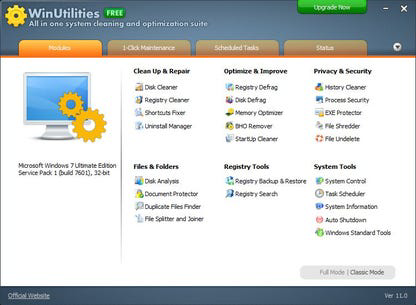
The application delivers a range of system maintenance capabilities designed to improve both performance and data security. The core functionality includes disk defragmentation and cleanup, which helps organize fragmented files on the hard drive to improve read/write speeds. The file shredder ensures that deleted data cannot be recovered, providing an added layer of privacy for sensitive files. The duplicate file finder scans the system to locate and remove redundant copies, reclaiming valuable storage space. A customizable task scheduler allows users to automate maintenance routines, such as periodic cleanup or defragmentation, without manual intervention. The One-Click Maintenance feature bundles multiple tasks into a single operation, streamlining the process for users who want immediate results. These tools are particularly useful in scenarios such as preparing a computer for resale, resolving sluggish performance, or maintaining long-term system health. The interface is structured to guide users through each function with minimal friction, and the built-in help file offers context-sensitive guidance. While specific technical details about execution speed or algorithmic precision were not provided, the integration of these features into a unified workflow enhances usability and effectiveness.Real-World Application Examples
- Automating weekly disk cleanup to prevent storage overload
- Using the file shredder before selling or donating a PC
- Running a one-click maintenance session after installing new software
- Identifying and removing duplicate photos or documents across drives
- Scheduling defragmentation during off-peak hours to minimize disruption
Interface, UX & Performance
WinUtilities Free Edition features a clean, minimalistic interface that organizes tools into clearly labeled sections, promoting intuitive navigation. The layout is designed with usability in mind, allowing users to access core functions without extensive training. Menus are logically grouped, and each tool is accompanied by descriptive icons and tooltips, reducing the learning curve for new users. The application responds promptly to user inputs, with minimal lag during scans and operations. Although the developer did not list formal performance metrics, the application maintains stable operation across different device categories, including desktops and laptops with standard configurations. Responsiveness is consistent during both routine tasks and intensive operations like full disk scans. Stability appears to be well-managed, with no reported crashes or freezes in the provided information. The user experience is further enhanced by the inclusion of a comprehensive help file, which offers step-by-step guidance and troubleshooting tips. The absence of intrusive ads or pop-ups contributes to a focused, distraction-free environment. Overall, the interface balances functionality with simplicity, making it suitable for users of varying technical backgrounds.Platform Compatibility & Technical Requirements
WinUtilities Free Edition is designed exclusively for the Windows operating system. It supports the latest versions of Windows, though specific minimum OS requirements were not listed. The application has a file size of 26.4 MB, indicating a lightweight footprint that does not strain system resources during installation or operation. The current version is 14.0.0.0, released on March 5, 2024. While compatibility with older Windows versions was not confirmed, the application is optimized for modern Windows environments. The developer did not provide additional technical details about RAM, processor, or storage requirements. Installation and uninstallation processes are reported to be smooth and issue-free, suggesting robust handling of system integration. Users can expect a straightforward setup with no dependency conflicts or configuration errors based on the available information.Pros and Cons
- Comprehensive suite of system maintenance tools in one application
- One-Click Maintenance simplifies routine optimization tasks
- Secure file shredder for permanent data deletion
- Effective duplicate file finder to reclaim disk space
- Task scheduler enables automated system upkeep
- Lightweight installation at 26.4 MB
- Free to download and use without time or feature limitations
- Specific system requirements were not disclosed
- Advanced features may be limited in the free version
- No information on cloud integration or cross-device sync
- Developer did not provide performance benchmarks or usage statistics
- Interface may appear dated to users accustomed to modern design trends


